
Owner's guide
Care, simple fixes and the warranty for the Bruno Elan, from Bruno's owner's manual.
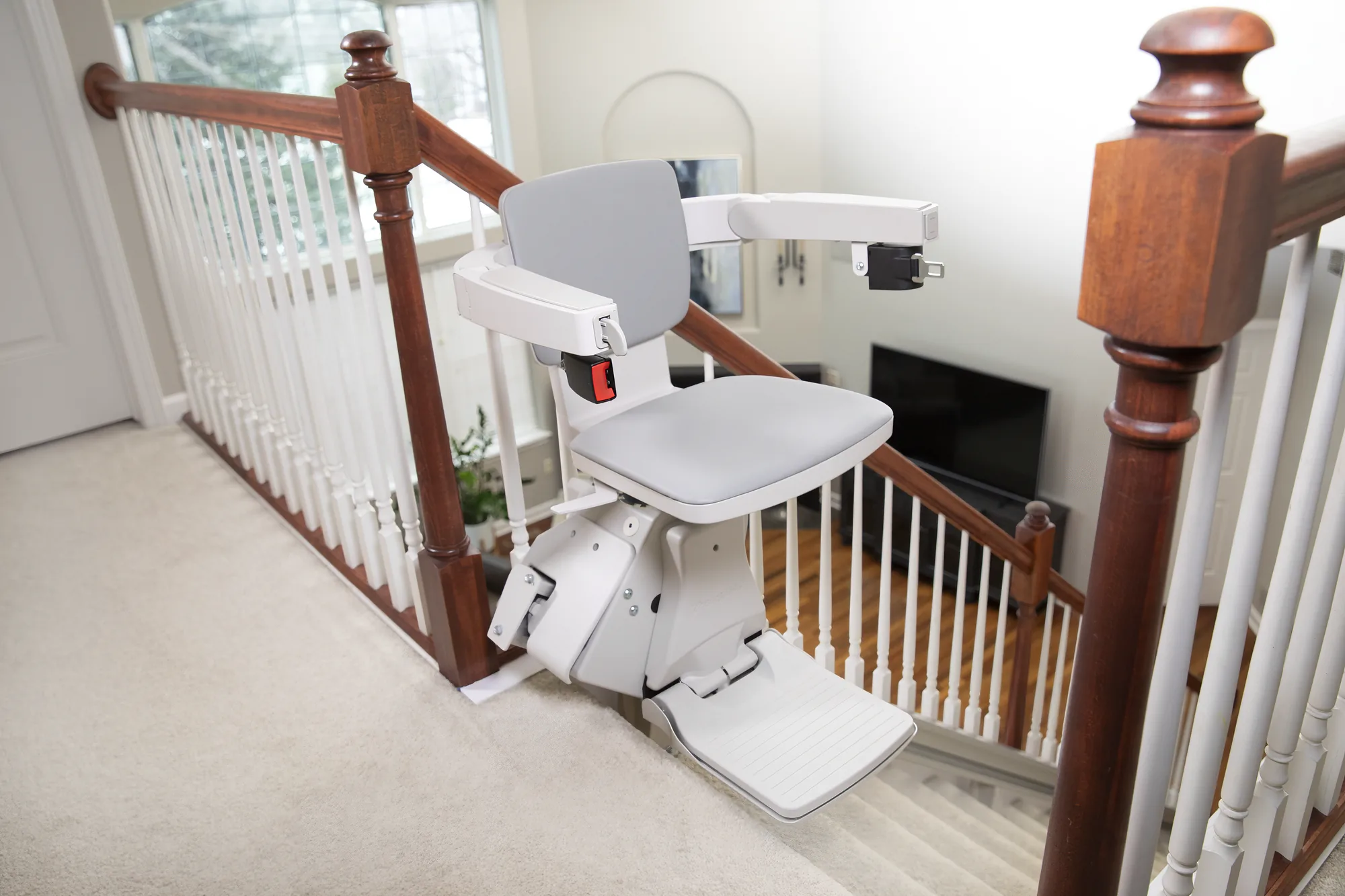
Know your Elan
1. Armrest paddle control
Hold it toward the direction you want to go. The chair moves only while you hold it.
2. Seat swivel lever
Under each side of the seat. Push it down to turn the seat at the top landing.
3. Circuit breaker with on/off switch
On the back of the carriage, out of view here. It protects the battery, controller and motor, and turns the lift off for storage.
4. Armrests
Fold up and down. Each can be turned back on its own for a slimmer profile or an easier transfer.
5. Seat belt
Fasten it before every ride.
6. Folding swivel seat
Padded. Turns at the top landing and flips up to save space on the stairs when nobody is using it.
7. Folding footrest with obstruction sensors
If it meets something on the stairs, the lift stops.
Looking after it
Everything Bruno's owner's manual asks of you. Anything beyond it is a job for an authorized Bruno dealer.
- Every day
- Keep the charger plugged into a live outlet. The chair charges wherever it's parked on the rail.
- Before you ride: stairs clear, seat locked in the riding position, belt fastened, no loose clothing, nothing carried that could catch.
- Now and then
- Glance at the charger light to make sure the lift is charging.
- Keep the rail channel clean and free of debris.
- Once a month
- Wipe all the rail surfaces except the gear rack with Pledge lemon polish or a similar wax-based cleaner.
- As needed
- Seat: mild soap and water on a soft, lint-free cloth. For harder stains, an all-purpose cleaner such as Formula 409 or Fantastik on a damp cloth, then rinse and dry. No vinyl conditioners or protectants.
- Remote and receiver lenses: a non-abrasive cleaner made for glass or acrylic. No polish or wax, which leaves a film that shortens the remote's range.
- Charge strips on the rail: isopropyl alcohol wipes, so dirt doesn't build up.
- Once a year
- Replace the remote batteries: two AA alkaline batteries in each remote.
- Have an authorized Bruno dealer examine, clean and lubricate the lift.
- Away for a while
- Turn the lift off with the on/off switch on the carriage and unplug the charger. When you're back, plug the charger in, switch the lift on, and wait until the charger light shows the batteries are fully charged.
- When the batteries wear out, a Bruno dealer replaces them.
- To keep the warranty, all maintenance and repair beyond what the owner's manual asks of you must be done by an authorized Bruno dealer.
Something not right?
Safe checks from Bruno's owner's manual. If a check doesn't fix it, or anything seems unsafe, stop using the lift and call your dealer.
The lift won't move
- Make sure the seat is locked in the riding position. The lift won't run with the seat turned.
- Check that the on/off switch (circuit breaker) on the carriage is on. Switching it off and on resets it.
- Look at the charger light (see the table below).
- Check that the charger is plugged in, that the outlet works (try a lamp), that it isn't controlled by a light switch, and that your home's breaker or fuse hasn't tripped.
- Clear anything on the stairs that could be pressing the footrest sensors.
Call your dealer if it still won't move, or if the circuit breaker keeps tripping.
It runs slowly, or goes down but not up
- Low batteries make the lift slow down and stop. Partly charged batteries can take the chair down the rail but not up.
- Check that the charger light shows the lift is charging.
- If the chair stopped on low batteries, Bruno's installation manual says about 10 minutes parked gives a partial charge.
Call your dealer if the light doesn't show charging, or if it keeps running slowly. The batteries may need replacing.
It stops partway
- The footrest sensors may have touched something. Press the paddle the other way to back up, clear the stairs, then carry on.
- Make sure the load on the chair is within 300 lb.
Call your dealer if it stops again with nothing in the way.
It beeps at the top when the seat is turned
- This is the reminder that the seat isn't in the riding position. Turn the seat back until it clicks and locks, and the beeping stops.
If only one person uses the lift, your dealer can switch the beep off.
It beeps while parked
- A repeating pattern of three short beeps and two long beeps means the chair is parked but isn't detecting the charger. Check that the charger is plugged into a live outlet that isn't on a light switch, and that its light is on.
For any other repeating beep pattern, note the pattern and call your dealer.
A remote doesn't work
- Remotes move an empty chair only. When you're riding, use the armrest paddle.
- Replace the remote's two AA batteries.
- Aim straight at the chair with nothing in between, and hold the button down.
- Keep direct sunlight off the receivers on the chair, and clean the remote and receiver lenses (no wax).
Call your dealer if it still doesn't work. The remotes may need to be re-paired.
The armrest paddle came off
- It's designed to break away. Line up the opening in the paddle with the pin in the armrest, then press firmly and evenly until it snaps in.
Call your dealer if it won't stay on.
The power folding rail won't lower
- Clear anything above or below the folding section. If the rail senses an obstruction, it stops and briefly reverses.
- Press the paddle or remote the other way, then again in the direction you want.
If it still won't lower, get off at the top of the stairs and call your dealer. Never fold a power rail by hand.
The power footrest jammed
- Clear the obstacle, then move the seat up and down until the footrest moves again. Don't fold it by hand.
Call your dealer if it doesn't go back to normal.
The ride feels rough or chattery
- Wipe down the rail surfaces, but not the gear rack, as in the monthly care.
Call your dealer if it continues. Lubrication is part of the dealer's yearly service.
What the charger light means
- No light
- No power reaching the charger, or the charger has failed. Check the outlet, then call your dealer.
- Red, steady
- The charger has power from the outlet. Normal when it's plugged into a live outlet.
- Red, flashing
- The batteries are defective. Call your dealer.
- Yellow
- Charging. Status OK.
- Green, flashing
- Reverse polarity in the unit. Call your dealer.
- Bruno's troubleshooting page adds that a red light on a lift that won't run means the charger has power but the lift isn't getting it, for example when the chair isn't resting on the charge strips or the strips are dirty.
- Bruno's dealer reference lists a steady yellow or green light as charging normally.
Warranty
Bruno's warranties begin on the day an authorized Bruno dealer installs the lift, which should be no later than 14 months after it shipped from the factory.
- Major components
- Lifetime
- The motor, gearbox, drivetrain and static rail system, for the lifetime of the stairlift as long as the original purchaser owns it. Optional equipment is not a major component.
- All other parts
- 2 years
- From the date of installation by an authorized Bruno dealer.
- Labor
- 30 days
- Labor by an authorized Bruno dealer to fix a defect, for the first 30 days after installation.
Mobility123 labor coverage
Mobility123 provides 1 year of labor coverage on the Bruno stairlifts we install. This is our own coverage, separate from Bruno's warranty above. As an authorized Bruno dealer, we also handle Bruno warranty claims for you.
Mobility123 policy. Not part of Bruno's warranty.
What isn't covered, and the conditions
Not covered
- Damage from misuse, abuse, accidents, neglect, or changes not made by an authorized Bruno dealer.
- Consumable items such as remote batteries.
- Dealer labor after the first 30 days.
- Reasonable wear and tear.
Conditions
- Warranty and service claims go to an authorized Bruno dealer.
- Maintenance and repair beyond the owner tasks in the manual must be done by an authorized Bruno dealer. A lift installed or maintained by anyone else loses its warranty.
- Bruno may repair or replace, or, where that isn't practical, refund the original purchaser's purchase price.
- Bruno isn't responsible for indirect, incidental or consequential damages. You may have other rights that vary from state to state.
Register the lift with the registration card that comes with it or the QR code in the owner's manual, and keep the serial number from the label on the lift. Your dealer needs it for warranty claims and parts.
Manuals and documents
Bruno's own documents for the Elan SRE-5000. The owner's manual covers operating, charging, care, troubleshooting and the warranty.
- Elan SRE-5000 owner's manualOperating the lift, charging, remotes, care, long-term storage, troubleshooting and Bruno's warranty (P/N 5000-O, 08-06-2026).PDF, 2.0 MB, 14 pages (opens in a new tab)
- Bruno Elan brochureBruno's overview of the Elan: features, options, key specifications and warranty highlights.PDF, 7.3 MB, 6 pages (opens in a new tab)
- Technical specifications (ILS-01617, Rev. P1)Bruno's specification sheet: capacity, drive, controls, safety equipment, standards, testing and options.PDF, 203 KB, 2 pages (opens in a new tab)
- Dimensional drawings (ILS-01614, Rev. P1)Side, top and elevation views with the standard dimensions, plus the seat turned at the top and the folding rail.PDF, 2.3 MB, 3 pages (opens in a new tab)
- Power options drawing (ILS-01616, Rev. 0)Seat and footrest heights for the power swivel and power footrest configurations.PDF, 1.1 MB, 1 page (opens in a new tab)